

If you want to install your server panel and use email for your organisation with limited access and block Gmail, Yahoo and other free social email outgoing but want to allow the incoming.
I will show the process to configure in postfix in the CWP7 panel, the same is applicable in all hosing where posts fix is used
Procedure to Block Email Outgoing
1. First log into the postfix folder with SSH.

2. create a file inside the postfix folder to update the email which outgoing you want to block.

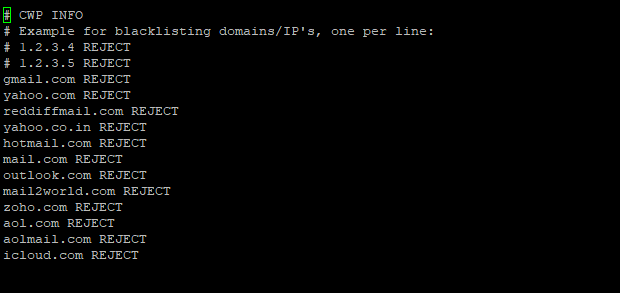
3. Edit sender_blacklist and update the email you want to black and don’t give space or add # before the email domain name and save the file

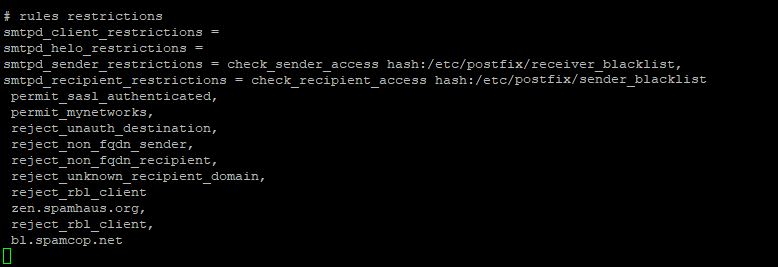
4. Edit main.cf and find #rule restrictions and replace with below code
smtpd_client_restrictions =
smtpd_helo_restrictions =
smtpd_sender_restrictions = check_sender_access hash:/etc/postfix/receiver_blacklist
smtpd_recipient_restrictions = check_recipient_access hash:/etc/postfix/sender_blacklist,
permit_sasl_authenticated,
permit_mynetworks,
reject_unauth_destination,
reject_non_fqdn_sender,
reject_non_fqdn_recipient,
reject_unknown_recipient_domain,
reject_rbl_client
zen.spamhaus.org,
reject_rbl_client,
bl.spamcop.nets
5. Type the postmap code to create a database and then restart the postfix.


For any query, you can send an email to support@thegogogo.com we will be able to help Saturday or Sunday