
Install Adinserter Plugin

I will not bore you about this app and will try to explain in short.
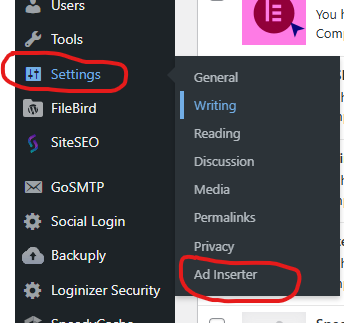
- After Plugin is activated, Click on setting optiona and then Ad Inserter opttion
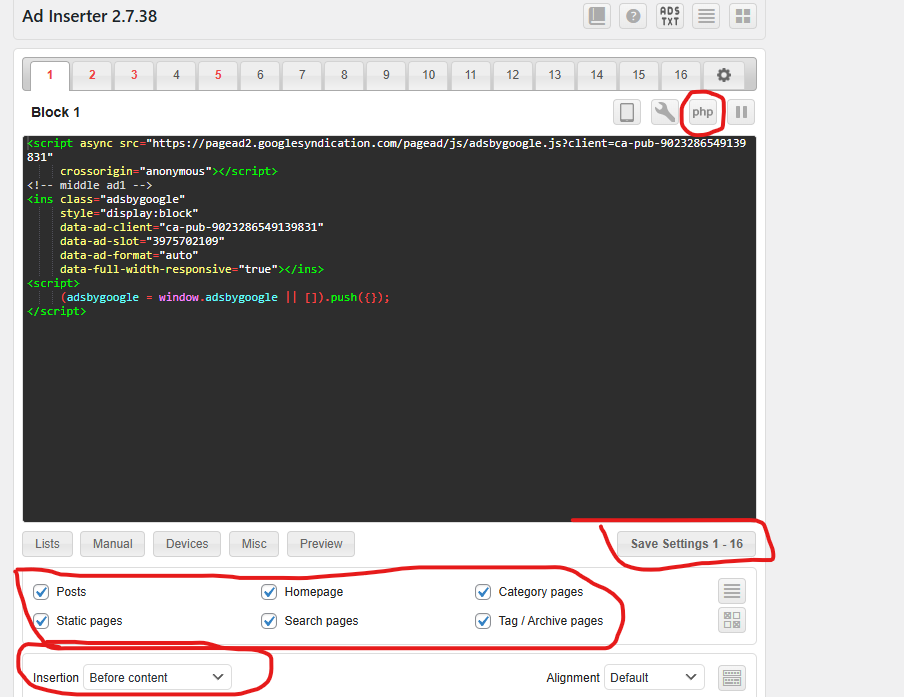
- Add you ADS code or Banner inside the Box and then tick the option where the ADS you want to show. In last option there is dropdown where you want to show the code
-
- Insert before or after post
- Insert before or after content
- Insert before or after paragraph
- Insert before or after random paragraph
- Insert before or after multiple paragraphs
- Insert before or after image
- Insert before or after comments
- Insert before or after excerpt
- Insert near any element on the page (using CSS selectors)
- Insert above the header (after
<body>tag) - Insert in the footer (before
</body>tag) - Insert at relative positions in posts
- Insert between posts on blog pages (in-feed AdSense)
- Insert between excerpts on blog pages
- Insert between comments
- Now Just See you website you will find the ADS or Banner.
This very small post I tried to write please like and subscribe us